
Paper Printing Methods: How B2B Buyers Can Choose the Right Printing Process
Paper printing is widely used for books, brochures, stationery and packaging. For B2B buyers sourcing custom notebooks, planners, sticky note pads and paper packaging, the printing method affects image reproduction, unit cost and reorder flexibility. Offset printing and digital printing are usually the first two options to compare for paper stationery. Flexographic printing is worth considering for labels, paper bags and corrugated shipping cartons; screen printing can suit covers that require a thicker ink deposit or high-opacity graphics; and gravure printing may be appropriate for certain packaging projects involving long, high-volume production runs.
The key is to define the substrate, quantity per design, color requirements and finishing operations before comparing quotations that meet those specifications. This guide explains five common printing methods from the perspective of wholesale stationery and private-label sourcing, and shows how print quantity affects cost.
Which Printing Methods Suit Different Stationery Products?
| Printing method | Products and requirements to consider | What to confirm in the quotation |
|---|---|---|
| Offset printing | Full-color paper covers, planner pages, exercise books and folding cartons | Platemaking charges, paper, number of colors, makeready waste and color standards |
| Digital printing | Small trial orders, multiple cover designs and personalized names or numbers | Quantity per design, substrate compatibility, variable data and finishing |
| Flexographic printing | Continuous production of labels, paper bags, wrapping paper and corrugated boxes | Anilox and plate specifications, substrate, detail reproduction and consistency of repeat demand |
| Gravure printing | Certain long-run film packaging and decorative paper projects | Cylinder preparation costs, frequency of artwork changes and long-term demand |
| Screen printing | Logos on fabric or suitable PU covers, and white graphics on dark substrates | Ink adhesion, opacity, number of colors and rub-resistance requirements |
Use this table to shortlist suitable processes. More than one method may work for a product, and the cover, inner pages and outer packaging of the same notebook may use different methods. Confirm the final choice against the actual materials and samples.
What Is the Difference Between Offset and Digital Printing?
Offset Printing for Repeatable Designs and Batch Production
Offset printing is a planographic process. The image transfers from a printing plate to a rubber blanket, and then from the blanket to the paper. Conventional wet offset printing relies on the different affinities of the image and non-image areas for ink and fountain solution.
Offset is a common option for full-color notebook covers, planner pages, promotional inserts and printed paperboard cartons. It can reproduce fine text and tonal detail, and can use spot-color inks. Color consistency, however, still depends on the paper, ink, press condition, color management and agreed acceptance criteria—not simply on choosing offset printing.
Offset usually requires platemaking and press makeready. As the quantity of an unchanged design increases, fixed setup costs can be spread across more finished units. For orders with many designs, small quantities per design or frequent revisions, plate and changeover costs need separate consideration.
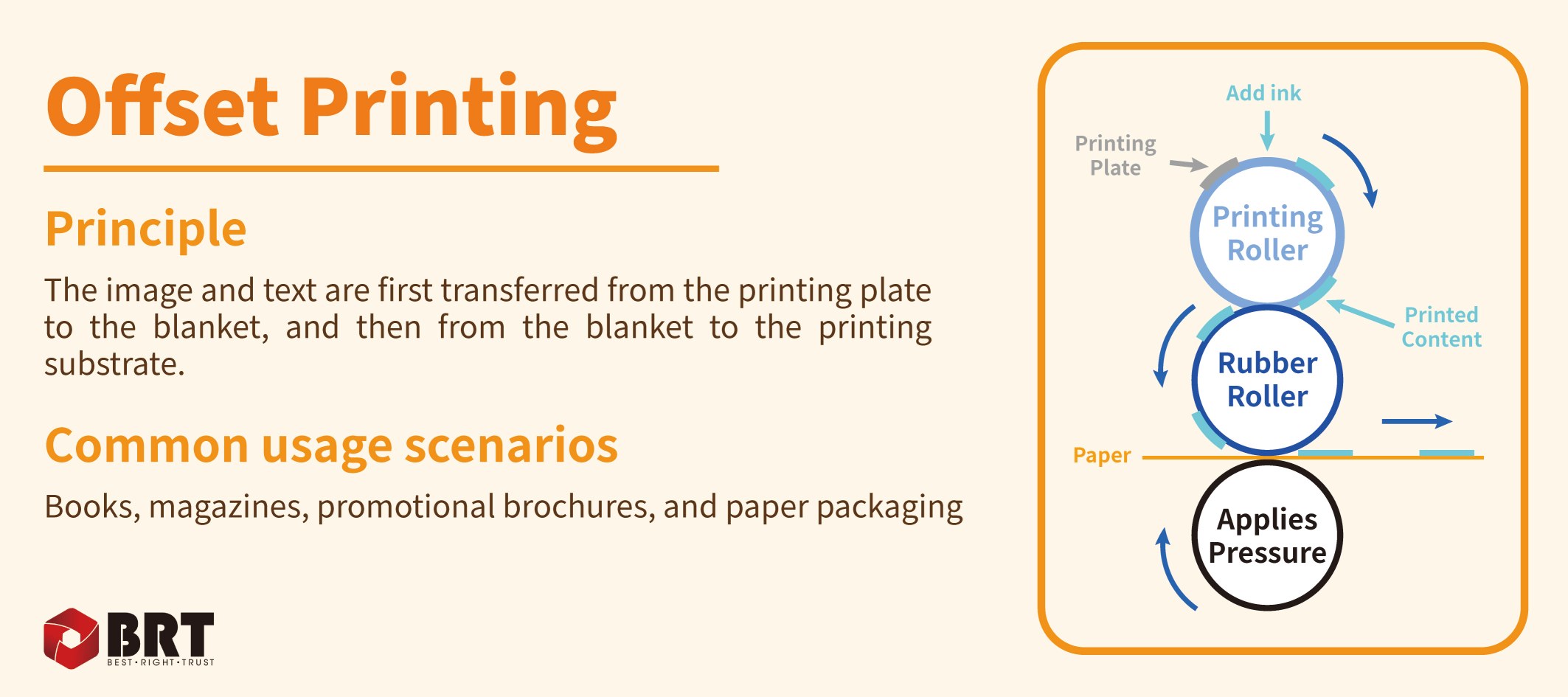
Figure 1. Offset printing transfers the image indirectly through a rubber blanket. Common applications include books, brochures and paper packaging.
Digital Printing for Short Runs and Personalized Content
Digital printing produces output directly from digital files, generally without conventional printing plates. Common technologies include inkjet and electrophotographic printing. It is worth evaluating for small product trials, multiple cover versions and orders with different names, serial numbers or QR codes.
Its advantages include flexible setup and variable-data printing. For example, if every planner in an order needs a different recipient's name, confirm that the supplier can manage the data and produce the required digital output. A hybrid approach is also possible: print the fixed content conventionally, then add personalized content digitally.
Digital equipment varies in its supported substrate thicknesses, sheet sizes and color configurations. Before selecting paper, confirm compatibility and test its performance after lamination, folding or heat-related processing. Some digital systems support an extended color gamut, specialty colors or spot-color options, so digital printing should not automatically be treated as standard CMYK only.
Compare Quantities per Design, Not Just the Total Order
The same total quantity does not necessarily mean the same production conditions. For example, 3,000 notebooks with one cover design and an order of 10 cover designs at 300 units each may differ significantly in platemaking, imposition, plate changes and makeready. This illustrates the effect of versioning; it is not a fixed crossover point between offset and digital printing.
Provide the supplier with the quantity per design, dimensions, page count, paper, number of colors and finishing requirements, then compare both processes on the same basis. Equipment and workflows affect their economical run lengths, so a rule such as "always choose offset above this quantity" is unreliable.
Why Do Both Flexographic and Gravure Printing Use Cylinders?
"Relief" and "intaglio" describe the position of the image areas relative to the non-image surface, rather than the overall shape of the printing form. Modern flexographic and gravure presses commonly use rotary printing units, but they carry and transfer ink differently.
Flexographic Printing Uses Raised Image Areas
Flexographic printing, also called flexo, is a relief printing process. A flexible printing plate is mounted on a plate cylinder. An anilox roller meters and transfers ink to the raised image areas, which contact the substrate to print the image. An impression cylinder provides support.
Flexo is commonly used for labels, wrapping paper, paper bags and corrugated boxes. For rolled substrates and regular production orders, consider how printing can be integrated with diecutting and other operations, depending on the equipment. The anilox roller also has cells, but these meter the ink. It is the raised image areas on the flexible printing plate that make flexography a relief process.
Flexographic image quality depends on platemaking, the anilox roller, ink, substrate and press control. Assess production samples for gradients, photographs or fine reversed-out text rather than assuming that flexo cannot reproduce detailed images.
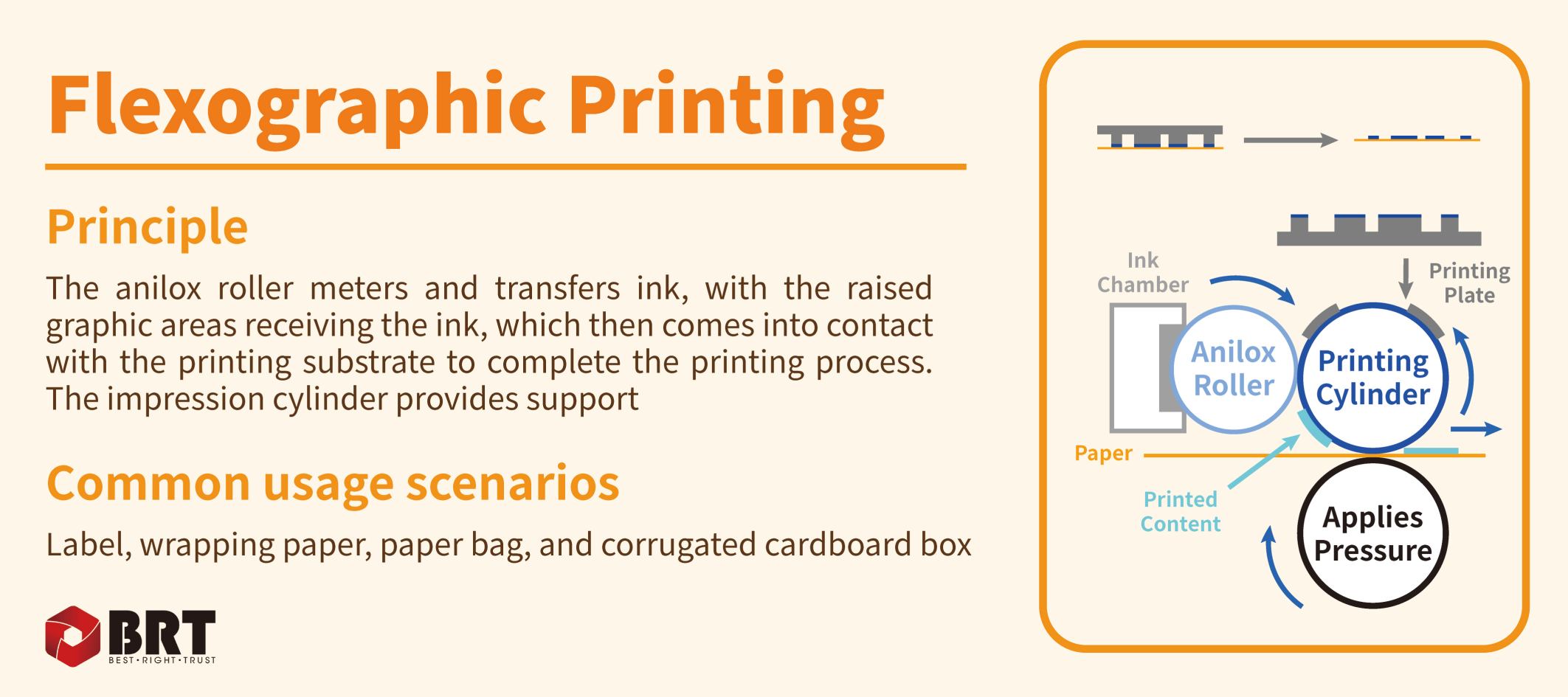
Figure 2. In flexographic printing, the anilox roller supplies ink to raised image areas. Common applications include labels, wrapping paper, paper bags and corrugated boxes.
Gravure Printing Holds Ink in Recessed Cells
In gravure printing, the image is formed by tiny recessed cells in the surface of the printing cylinder. After the cylinder picks up ink, a doctor blade removes excess ink from the surface. The ink remaining in the cells transfers to the substrate at the printing nip. Tonal reproduction depends on factors including cell volume, area and depth.
Gravure is commonly used for certain high-volume film packaging and decorative material projects. Cylinder preparation costs and lead times should be assessed against long-term orders, particularly the stability of the design and the frequency of artwork changes. For standard notebook or planner sourcing, a large total order alone is not a reason to switch to gravure: the process must first suit the product and its materials.
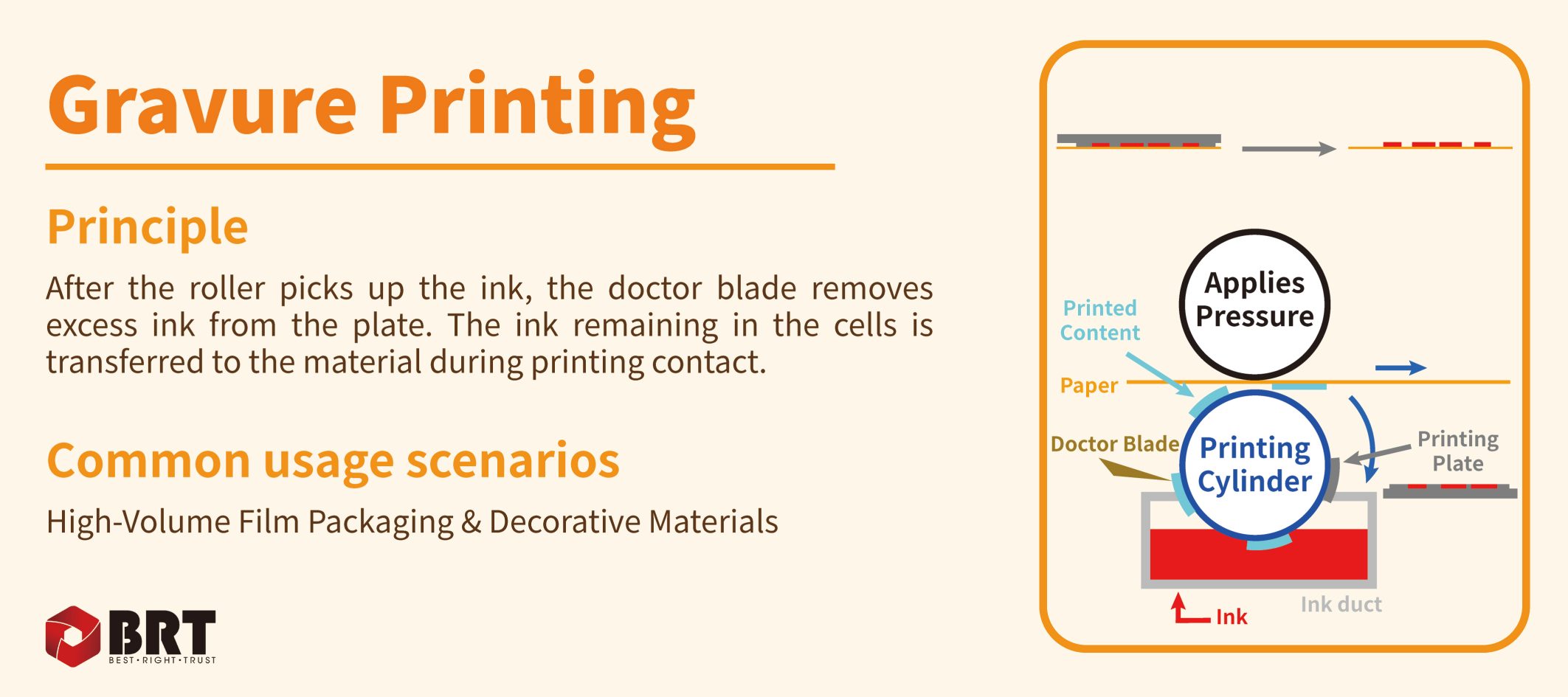
Figure 3. Gravure cylinder cells hold ink. After the doctor blade removes excess surface ink, the remaining ink transfers to the substrate at the printing nip.
Which Covers and Logos Suit Screen Printing?
Screen printing is a stencil printing process. A squeegee pushes ink through the open image areas of a screen, while the non-image areas are blocked. It is commonly used for graphics on fabric, suitable polyurethane (PU) materials and other compatible substrates, and can provide high-opacity white graphics on dark surfaces.
Screen printing can be useful for logos with a limited number of colors, thicker ink deposits or specific surface effects. However, a thicker ink layer does not automatically mean better rub resistance or adhesion. The ink system, substrate surface, curing conditions and end-use environment must be compatible. Where necessary, verify adhesion and rub resistance on actual samples.
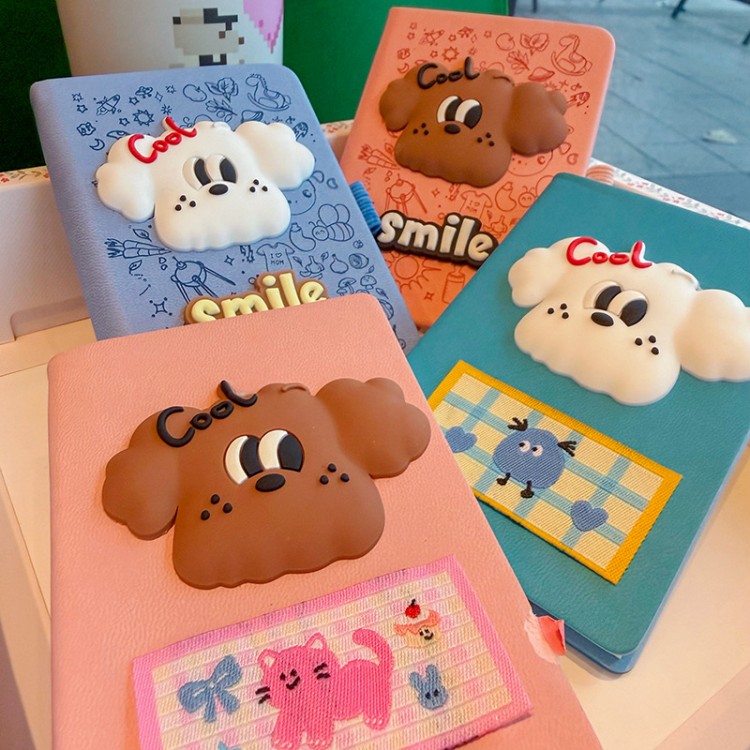
Branding on PU or fabric covers may also use foil stamping, embossing, debossing or other decorative processes. Describe the required appearance and feel first, then determine whether the project calls for printing or another surface-finishing method.
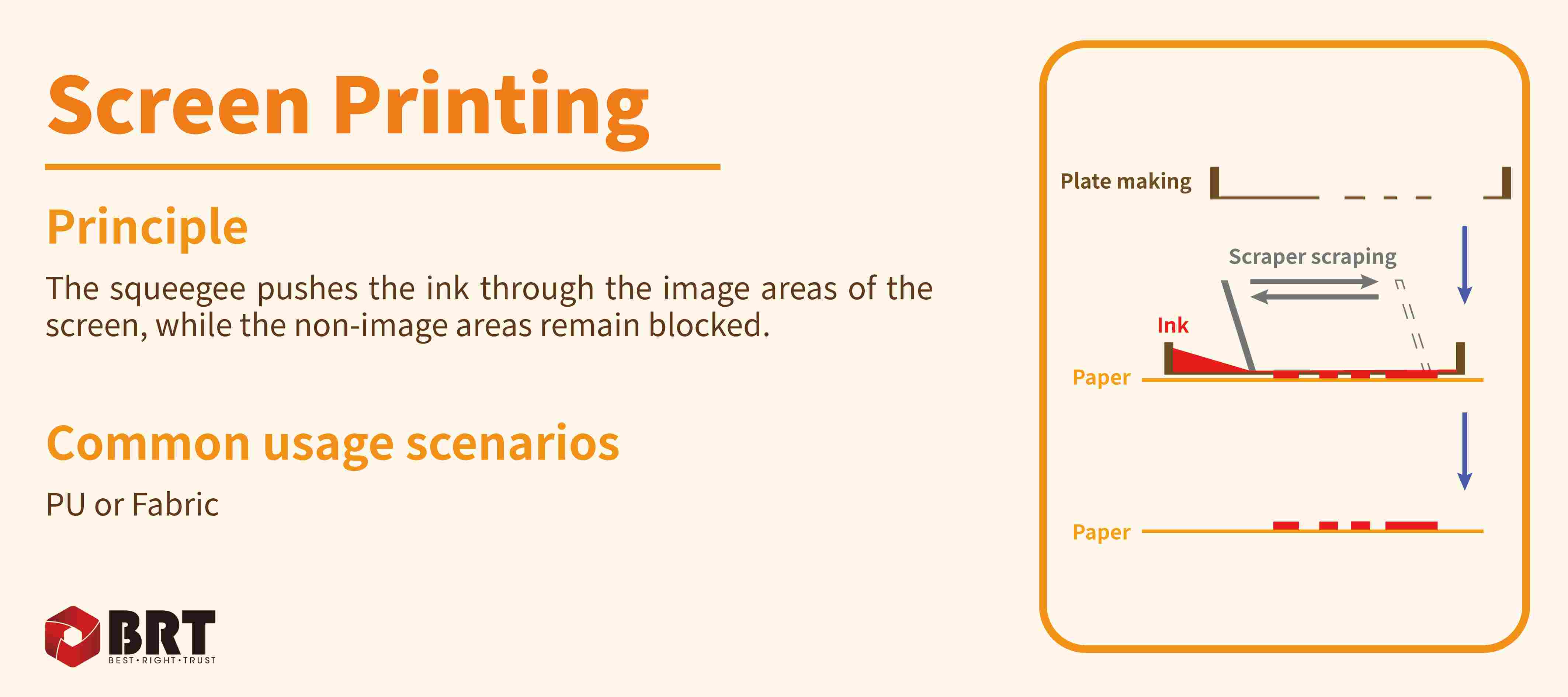
Figure 4. In screen printing, image areas allow ink to pass through while non-image areas remain blocked. The process can be used on compatible PU or fabric substrates.
How Does Print Quantity Affect Unit Cost?
When product specifications and production conditions remain broadly stable, a simplified model helps explain cost: unit production cost is approximately the fixed setup cost divided by the number of acceptable units delivered, plus the variable cost per unit.
Fixed setup costs may include plate, screen or cylinder preparation, file processing and press makeready. Variable costs include materials, ink, production time and associated waste. Freight, insurance, duties, taxes and other import-related charges must be calculated separately, so this model does not represent the full landed cost.
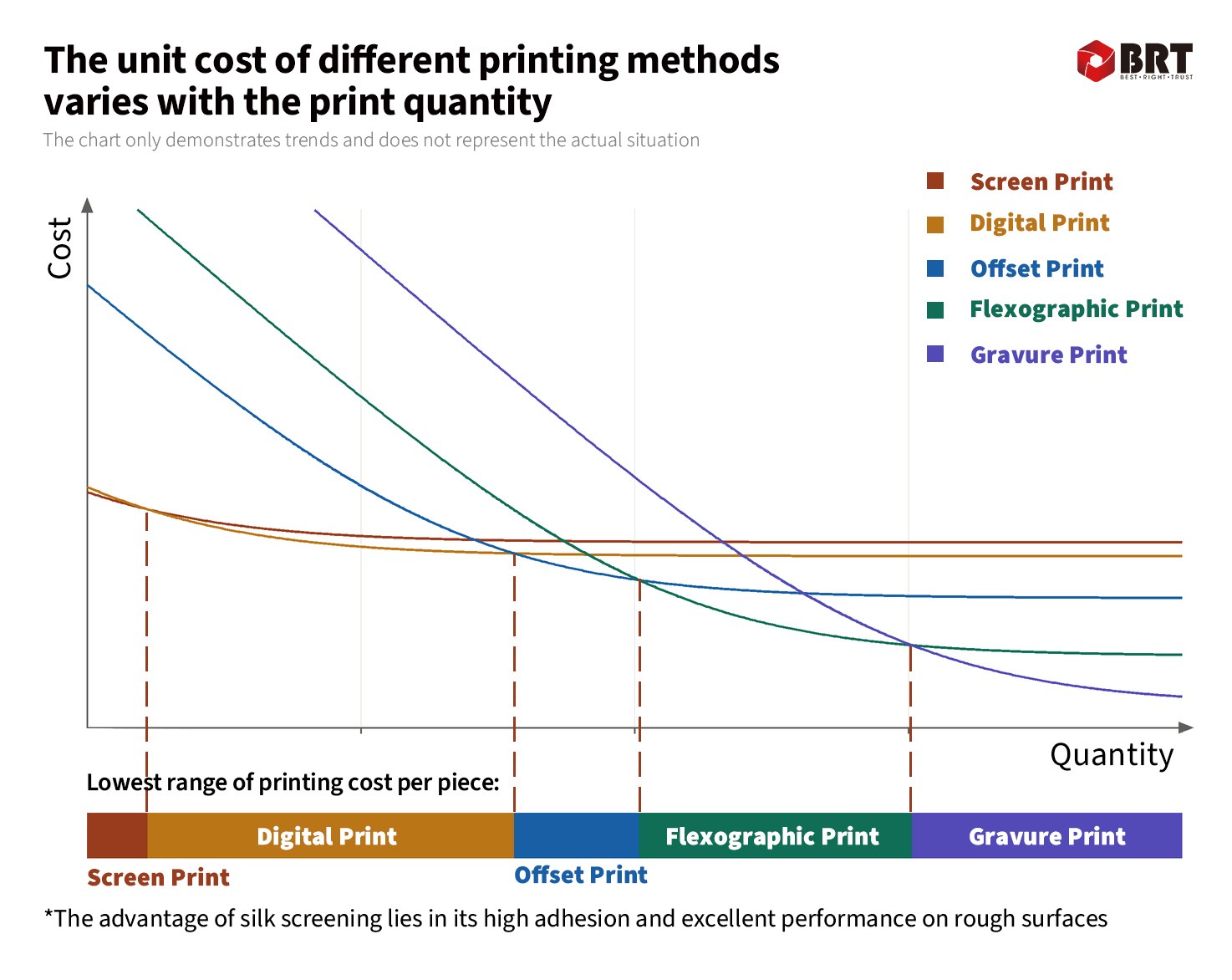
Figure 5. Illustrative printing cost curves. The chart has no numerical quantity or price scale. Its crossover points and bottom color band represent hypothetical conditions, not actual quotations or a universal ranking of printing processes.
First, look at how fixed costs are spread across the run. When the same setup cost is allocated to more acceptable finished units, the amount per unit usually falls. For example, doubling the quantity while keeping setup costs unchanged halves the setup-cost component per unit—not the entire finished-product unit price.
Next, look at where the curves flatten. Materials and production still cost money, so unit prices do not approach zero indefinitely as quantity increases. Actual quotations also reflect purchasing price breaks, imposition efficiency, changeovers, waste and scheduling, and may not follow a smooth curve.
Finally, check whether the processes are genuinely interchangeable for the job. Screen, digital, offset, flexographic and gravure printing may not produce the same product to the same standard. Do not choose a process simply by following the bottom color band. First shortlist the methods that meet the substrate and quality requirements, then compare actual quotations at the relevant quantities.
A practical approach is to request separate quotations for a trial order, the expected regular order quantity and a replenishment order, with platemaking and makeready charges identified. This makes it easier to judge whether a lower unit price justifies carrying more inventory, rather than focusing only on the lowest production cost per unit.
How to Specify Printing for Custom Notebooks and Paper Stationery
Start with the Product Construction and Substrate
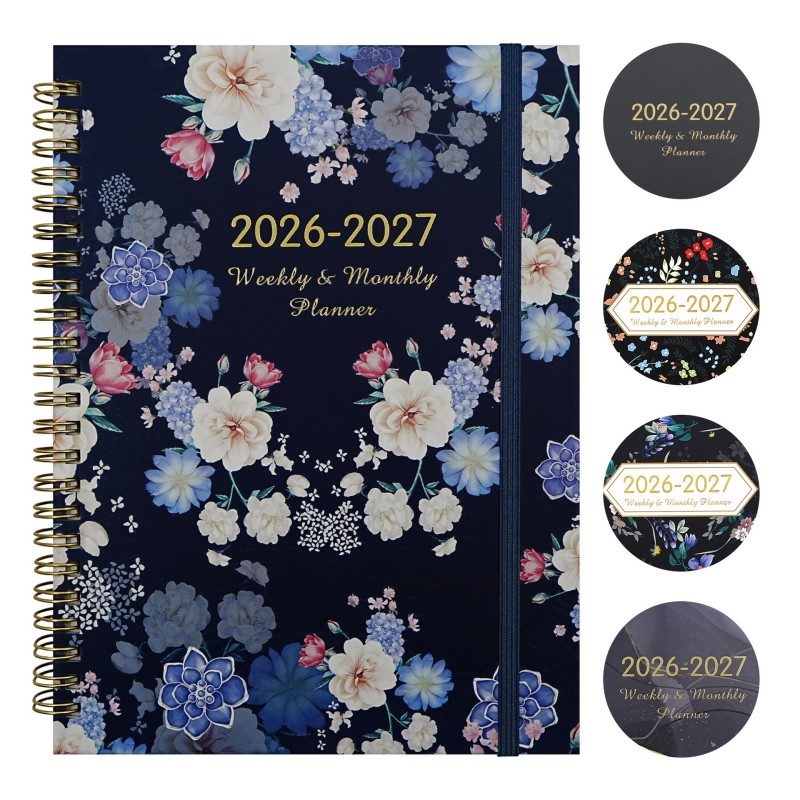
For notebooks with paper-covered boards, request separate pricing for the printed cover wrap and inner pages. For paper planners, specify the calendar version, page count and language. For sticky note pads, consider dimensions, paper, sheet count, adhesive area and writing requirements. A product name alone is not enough to compare suppliers' unit prices.
Paper grammage, usually expressed in grams per square meter (gsm), does not determine process suitability by itself. Coating, thickness, surface texture, ink absorbency and feeding performance also affect the result. For dark, metallic or heavily textured substrates, establish early whether an underbase, special ink or surface treatment is needed.
Define Color Requirements in Verifiable Terms
If brand color is critical, provide a color reference or physical sample and agree on the substrate, viewing conditions, measurement method and acceptable color difference. Offset, flexographic and screen printing can all use spot-color inks, and some digital systems also offer relevant configurations. The question is whether the specific production setup can achieve the agreed target.
Digital proofs, press proofs and production output may use different materials or imaging processes. When approving a sample, state whether it confirms content, construction, color or the complete production result. Content approval should not automatically be treated as color approval.
Specify Finishing Before Requesting a Printing Quotation
Lamination, foil stamping, embossing, die-cutting and binding can affect material selection, ink compatibility and delivery schedules. Although this article focuses on printing, include these downstream requirements in the initial inquiry. Assess the combined result in advance, especially around folds, dark solid areas, laminated covers and personalized overprinting.
Check Artwork and File Versions Before Placing the Order
A clear preview file may be sufficient for an initial quotation. Before production approval, submit print-ready files that meet the supplier's requirements and check the finished dimensions, bleed, safety margins, fonts, image resolution and color settings. Identify spot colors, white ink and local finishing areas clearly. Supply separate data for variable names, numbers and QR codes, and spot-check sample output.
For planners, pay particular attention to the year, dates, language and page sequence. Give cover, inner-page and packaging files separate identifiers, and record the version and approval date to reduce the risk of outdated artwork being used. Bleed dimensions and file formats should follow the actual production requirements rather than a universal specification.
What Should Buyers Confirm About MOQs and Quotations?
The minimum quantity a printing technology can produce is not the same as the minimum order quantity (MOQ) for a finished stationery product. Even if a digital device can print a single sheet, custom notebooks may still be subject to constraints from paper purchasing, binding components, tooling, packaging and production planning. Ask for the MOQ for the specific product, rather than relying on a universal table of minimum quantities by printing method.
Before approving a quotation, confirm the following:
● Whether the quantity per design, total quantity, dimensions, page count and number of printed sides match across quotations.
● Whether substrate specifications, the number of colors, spot colors and white-ink requirements are clearly defined.
● Which printing process is proposed and whether an alternative can meet the same quality requirements.
● Whether the unit price includes platemaking, makeready, sampling, waste and finishing.
● The sample type, basis for color acceptance and agreed overrun or underrun tolerance.
● Whether plate data or cylinders can be reused for repeat orders, and which charges apply again after artwork changes.
● The time required for sampling, material preparation, printing, finishing and packing.
Frequently Asked Questions About Stationery Printing
Which Printing Method Gives the Best Quality?
There is no single answer independent of the product. Fine text, photographic detail, spot-color consistency, white-ink opacity and adhesion are different objectives. Assess samples on the intended substrate rather than judging quality solely by the process name or the cost of the press.
Must Small Notebook Orders Use Digital Printing?
No. Digital is often worth comparing first, but the paper, format, color requirements and finishing operations may change the result. Offset may also be competitive when the supplier can use an efficient imposition arrangement. Request quotations based on the actual quantity per design and complete specifications.
Can Digital Printing Match Brand Spot Colors?
Some devices simulate brand colors using CMYK or an extended color gamut; others support spot-color or specialty-ink configurations. Suitability depends on the target color, substrate and equipment. Approve samples against the agreed color standard.
Why Is Flexography a Relief Process If the Anilox Roller Has Cells?
The cells in the anilox roller meter the ink; the roller is not the image-bearing printing plate. The image areas on a flexible plate sit above the non-image areas, making flexography a relief process. In gravure, recessed cells in the printing cylinder itself hold the ink and form the image.
Are UV Printing and Offset Printing the Same Type of Term?
No. UV generally describes the ultraviolet curing of ink or coatings. It can be used with offset, flexographic, screen and inkjet processes. Confirm both the printing method and the curing system when requesting a quotation, rather than judging the result from the term "UV" alone.
Is a Larger Order Always Better Value?
Increasing the run length usually reduces the setup-cost allocation per unit, but buyers should also consider working capital, storage and the risk of designs becoming obsolete. For untested products, a trial order followed by replenishment may better serve the overall cost objective.
Choose a Printing Process That Fits Your Stationery Project
The printing process should support the product's positioning and purchasing plan. Define the substrate, quantity per design, artwork and color standard first, then compare processes, samples and complete quotations. This can reduce repeated artwork revisions and sampling.
If you are developing custom notebooks, planners, sticky note pads or matching paper packaging, contact BRT with your artwork, dimensions, quantity per design, preferred materials and target delivery date to discuss printing and production options for your project.
Related News
- Print Finishing Techniques: Lamination, Foil, UV, Embossing & Die Cutting
- How Should B2B Buyers Compare Packaging Costs for Cross-Border Stationery Orders
- Sewn, Spiral or Glue Binding: Which Notebook Construction Is Best?
- OEM vs ODM Stationery for Retail Brands: How to Choose the Right Sourcing Model
- Pencil Case Materials, Styles, Features Guide
- Back-to-School Stationery Sourcing Calendar for Retailers: When to Order for 2027
Leave me a message