
How to Prepare Artwork for Printing: A Prepress and Proofing Guide for Stationery Buyers
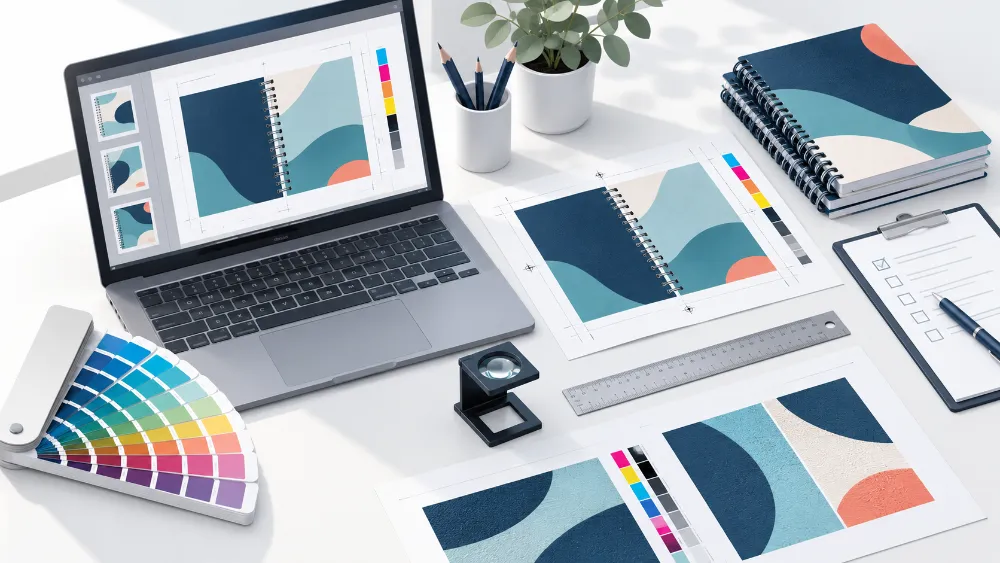
Figure 1. Prepress file and sample preparation. AI-generated illustration, not a company photograph.
Print quality depends on the artwork as well as the equipment. Insufficient bleed, low-resolution images, four-colour small black text or an unclear brand-colour reference can increase revision costs and affect the finished result and delivery schedule.
This is Part 4 of our stationery printing series. Part 1 covers printing methods, Part 2 covers finishing, and Part 3 covers binding. This article focuses on preparation before production: what files to supply, how to communicate colour requirements and which samples to approve.
Quick answer: use the supplier-approved template and PDF specification; check image resolution at final print size; add bleed to edge-to-edge designs and keep essential content clear of trimming and binding areas; define a brand-colour reference; and approve proofs appropriate to the order before bulk production.
BRT can provide file adjustments and prepress checks within an agreed scope to help identify potential production issues. Customers should still check their content and artwork before submission and approve the final revised files.
The values below are starting points for initial checks. Final requirements depend on the supplier-confirmed materials, processes, product templates and file specifications.
1. What file format should you send?
For notebooks, notepads and paper packaging, a PDF/X file that meets the supplier's requirements is usually recommended. It reduces ambiguity around fonts, colour and output conditions, but does not replace preflight checking.
|
Format |
Main features |
When to consider it |
|
PDF/X-4 |
Supports live transparency and colour management; may include appropriately tagged RGB and Lab content |
When the supplier supports the corresponding workflow |
|
PDF/X-1a |
Restricts colour to CMYK and spot colours; transparency must be flattened |
When the supplier requires a more conservative delivery workflow |
Both standards involve font embedding and an output intent. The output intent identifies the intended printing conditions; it does not automatically convert every object correctly. Choosing a preset called “Press Quality” does not, by itself, establish PDF/X compliance.
Confirm the template before exporting. Ask the supplier about:
· Finished dimensions, bleed, safe areas and binding margins.
· Whether covers and inside pages should be separate, and whether inside pages should be supplied as single pages or spreads.
· PDF/X version, colour settings and whether crop marks are required.
· How to identify cutting dies, foil, embossing, debossing and spot UV.
Fonts should normally be embedded in the PDF. Supply outlined text when the supplier specifically requests it, and retain an editable original. If native design files are needed, organise linked images, font-use conditions and version information.
Dielines and finishing elements should use clearly named layers or spot colours with supplier-approved settings. A separate dieline layer alone does not prevent it from printing: confirm separations and output settings as well.
2. How do you check image resolution and logo artwork?
Image clarity depends on effective resolution at final print size, rather than a resolution label in file properties.
Effective PPI = image width in pixels ÷ printed width in inches
A 3,000-pixel-wide image produces 300 PPI at 10 inches wide, but only 150 PPI at 20 inches wide.
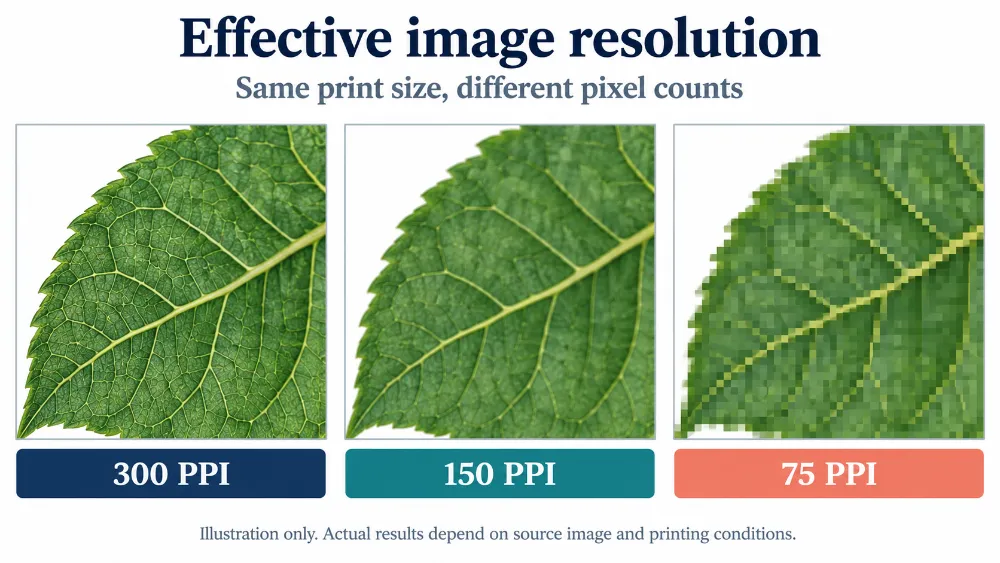
Figure 2. Illustrative resolution differences at the same display size. This is not a measured print test; results depend on the source image and printing conditions.
For paper stationery and photographs viewed at close range, around 300 PPI at final size is a common starting point. Equipment, screening, substrates and viewing distance can change the requirement. PPI describes image pixels; DPI describes device output dots. In practice, communicate both pixel dimensions and print dimensions.
Use vector artwork for logos, text, line art and barcodes where possible. Vector paths do not become pixelated when enlarged, although any photographs embedded in the file still require a resolution check.
Changing a small image's resolution label to “300” does not add original detail. Interpolation or AI enlargement may improve appearance, but cannot reliably reconstruct accurate logos, text or barcodes. Obtain better originals, recreate suitable graphics as vectors, or reduce the printed size.
For products such as cartoon-shaped reminder sticky notes, keep outlines, text and simple graphics as vectors where possible. For customised shapes, distinguish the cutting outline from printed artwork and check edge details against the supplier's template.
3. How should you set bleed, safe areas and binding margins?
Distinguish three boundaries:
· Trim line: the final finished edge.
· Bleed area: artwork extending beyond trim to accommodate cutting variation.
· Safe area: space inside trim that protects text, logos, page numbers and barcodes.
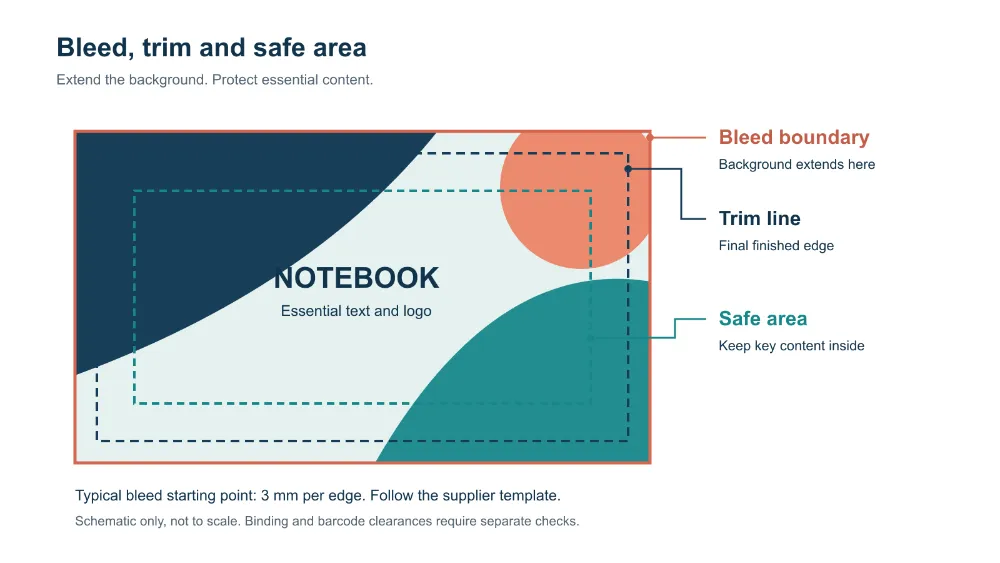
Figure 3. Extend backgrounds to the bleed boundary and keep essential content inside the safe area. Schematic only, not to scale.
Printed sheets are subsequently cut, folded or bound, and these operations have tolerances. If a background stops exactly at trim, a small cutting shift can expose a white edge.
A common starting point for small paper products is 3 mm bleed on each edge. Imperial templates often specify 0.125 inches, approximately 3.175 mm; use the template's exact value. Die-cut packaging and special products may need different allowances.
Plan essential text and logos at least 3–5 mm inside trim as an initial guide, then increase margins to suit the structure. Barcodes also require their own specified quiet zones.
Common mistakes include:
· Stopping backgrounds short of the bleed boundary.
· Enlarging an entire page to “add bleed”, changing element sizes and positions.
· Placing thin borders too close to the finished edge, making cutting variation conspicuous.
· Keeping text clear of trim but placing it within punching, folding or binding areas.
Binding margins are not universal. Perfect binding, case binding, saddle stitching, Wire-O and spiral binding have different requirements. Cover spread dimensions and spine width also depend on materials, page count and construction. Follow the approved template rather than deciding independently whether the binding edge needs bleed.
For bound products such as the 2026–2027 A5 spiral planner notebook, allow for punching as well as cover bleed. Keep headings, dates and page numbers clear of the binding area, using margins confirmed in the template.
4. Should you choose CMYK or Pantone spot colours?
CMYK combines cyan, magenta, yellow and black inks to reproduce photographs, gradients and multicolour layouts. Spot colours use separately specified inks for controlled brand colours, flat areas and particular metallic or fluorescent effects.
|
Design requirement |
Typical option to consider |
|
Photographs, illustrations and complex colour variations |
CMYK |
|
A logo or flat area with a defined brand-colour requirement |
Evaluate spot colour |
|
Metallic, fluorescent or other special effects |
Special inks or an appropriate finishing process |
|
Brand colours on a digital press |
Confirm whether the colour is simulated and review a sample |
Spot colours help control colour, but do not guarantee identical appearance across materials or production batches. Paper colour, absorbency, gloss, inks and lamination can affect the result.
Specify the exact Pantone reference and system, for example Pantone 286 C. C and U refer to coated and uncoated paper references. The same number can look different on different papers, so a screen swatch alone is insufficient for brand-colour approval.
If actual spot-colour ink is required, preserve its definition in the artwork and specify the requirement in the order. A digital device displaying or simulating a Pantone number does not necessarily use that spot ink.
Cost differences depend on equipment, quantity, layout and the number of colours. For simple one- or two-colour designs, ask the supplier to compare options rather than assuming a fixed surcharge.
5. What black should small text use, and how much ink is acceptable?
Small black text, fine lines and conventional black-on-white barcodes normally use single-colour black: C0 M0 Y0 K100. This reduces coloured fringes caused by multi-ink registration variation.
Large black backgrounds sometimes use rich black, combining black with other process colours for a deeper appearance. The supplier should confirm the build for the paper, printing conditions and colour profile. Avoid treating one recipe as universal.
Total area coverage (TAC) is the sum of CMYK percentages at the same location. For example:
C60 + M40 + Y40 + K100 = 240% TAC
Suitability depends on the output conditions. Check the highest-coverage area, not the page average. Spot colours are outside the four-channel CMYK sum, but overlapping spot inks still require assessment of ink layers, drying and subsequent processing.
Check overprint settings. Small black text commonly overprints coloured backgrounds, although dark backgrounds may reduce contrast. White objects accidentally set to overprint may disappear in output. Enable overprint preview and have prepress staff check separations, knockouts and finishing colours.
6. What should a proof verify?
Proofing helps identify problems early and establishes an agreed production and acceptance reference. Choose the proof according to what needs verification.
|
Proof type |
Main purpose |
Limitations to understand |
|
PDF proof |
Text, layout, dimension annotations and element placement |
Ordinary screen viewing does not reliably represent final print colour |
|
Colour-managed soft proof |
Colour assessment using a calibrated display workflow |
Depends on display, settings and viewing conditions; does not verify tactile materials or physical finishing |
|
Digital contract proof |
Simulation of target printing colour under specified conditions |
Confirm the simulated printing conditions and validation method; normally not the final production material |
|
Ink proof on target material or press proof |
Assessment of ink and material together under conditions closer to production |
Confirm the actual equipment, materials and processes included |
|
Finished sample with post-print processing |
Combined effects of lamination, foil, spot UV, embossing, debossing and binding |
Record differences in material or manufacture from the planned bulk run |
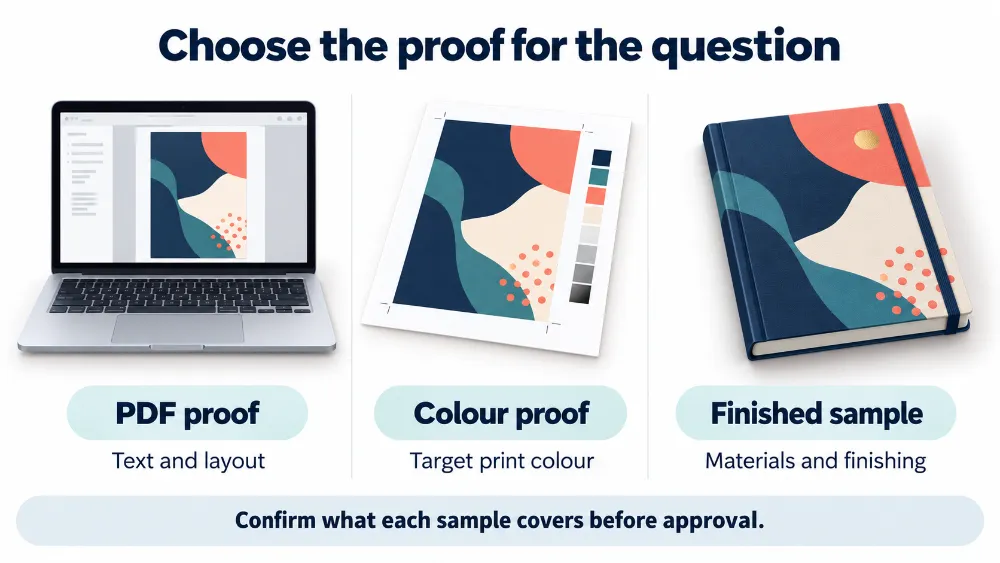
Figure 4. PDF proofs, colour proofs and finished samples cover different questions. Confirm the scope before approval.
Not every digital sample is a contract proof. If colour validation against a standard is required, ask whether the supplier follows appropriate requirements such as ISO 12647-7 and can provide validation results.
A press proof does not automatically include finishing. To assess the effect of matt lamination, foil edges or spot UV alignment, inspect a sample that actually includes those processes.
Record the following at approval:
· File and sample versions, dates and identifiers.
· What the sample verifies and what it excludes.
· Actual materials, printing method and finishing.
· Revisions, accepted differences and approval decisions.
· Acceptance criteria for colour, dimensions and other critical features.
Include these details in the agreed order or quality specification. Complete relevant approvals before bulk production and allow time for proofing and revisions.
For a product such as the A5 lined hardcover notebook with bookmark, review the cover appearance, page layout, bookmark position and binding against the order requirements. If special surface finishes are selected separately, confirm that the sample includes them.
7. How should you specify a brand-colour tolerance?
“Close enough” or “match the screen” is not an adequate colour specification. First establish the reference: an approved physical sample, a specified colour guide or an agreed measurement target.
When using ΔE, specify the calculation formula. ΔE76, ΔE94 and ΔE00 are not interchangeable. Define measurement conditions, instrument settings, backing, sample condition and whether acceptance uses a maximum single-point difference or an average across measurements.
Avoid applying one fixed ΔE value to every material. Coated paper, uncoated paper, kraft paper and plastic surfaces behave differently. Agree achievable tolerances using samples and production capability.
Visual comparison should use agreed standard viewing conditions, such as an appropriate D50 environment. Comparing samples under different office lighting can produce inconsistent judgments.
8. How do you reduce risks with barcodes, small text and fine lines?
Minimum type sizes and line widths depend on the process, material, typeface and positive or reversed design. Do not judge solely from an enlarged screen view. Fine serifs, reversed text, rough paper and special processing may need larger features.
Converting a thin stroke into a filled shape does not increase its physical width or overcome a production limit. Strokes and gaps must meet the process requirements at final size.
Check retail barcodes separately:
· Use an original barcode that complies with the relevant symbology; vector files are preferred.
· Maintain correct proportions and required height; do not squash or truncate it.
· Preserve quiet zones for the barcode type and application.
· Normally prefer single-colour black bars on white; validate other combinations.
· Avoid trim, folds, binding, pronounced curves and interfering graphics.
· Ask the supplier to confirm orientation and bar-width compensation for the printing process.
One successful scan with a phone or scanner does not establish barcode quality. For retail products, verify actual printed barcodes to the customer's or channel's requirements and retain the report.
For list products such as shopping list and to-do list magnetic notes, check headings, checkboxes, fine rules and writing areas at actual size. If retail barcodes are included, check their quiet zones and printed quality separately.
Artwork checklist before placing an order
|
Check |
What to confirm |
|
Product template |
Approved finished size, structure and template version |
|
File format |
PDF/X version and export settings meet supplier requirements |
|
Fonts and links |
Fonts embedded or outlined as requested; no missing images |
|
Images |
Effective resolution meets requirements at final size |
|
Bleed and safe areas |
Backgrounds reach bleed; essential content avoids cutting and processing areas |
|
Binding |
Binding margins, punching areas, cover spread and spine width confirmed |
|
Colour |
CMYK output conditions, spot colours and brand-colour references specified |
|
Black and ink coverage |
Appropriate small-text black; rich black and TAC suit output conditions |
|
Finishing elements |
Clear naming and output settings for dies, foil, spot UV and other processes |
|
Overprint |
Black text, white objects, knockouts and finishing colours checked |
|
Barcodes |
Proportions, quiet zones, placement and printed verification requirements confirmed |
|
Version control |
Product code, version and date in filenames; approved version identified |
|
Proof approval |
Sample coverage, revisions and acceptance reference defined |
A practical workflow is to confirm specifications and templates, submit files for checking, revise them, arrange suitable proofs and then approve bulk production. Resolving questions before files are finalised is usually more efficient than correcting issues after production starts.
File support and customer approval
BRT can provide file adjustments and prepress checks within a scope agreed for the files and order. Explain the help needed when submitting artwork, such as bleed adjustments, dimension checks or colour-setting checks. Confirm the specific changes before work begins. Missing assets, low-resolution images, complex design reconstruction or brand-colour decisions may still require customer originals or input from the designer.
Supplier preflight primarily assesses suitability for the agreed production workflow. It does not replace customer review of design content. Customers should check wording, product information, logos, barcode data, image-use permissions and brand requirements; review dimensions, bleed and safe areas; and approve revised PDFs or samples. Changes that may affect design intent should receive customer approval before production.
Provide editable originals and clear revision instructions, retain version records and approve final artwork and relevant samples before the bulk run. A file check does not establish that all materials, colours or finishing effects have been verified; confirm these through the agreed proofing and acceptance procedures.
Frequently asked questions
Can I print a logo supplied only as JPEG?
It depends on pixel dimensions, print size, compression and graphic detail. Ask the brand designer for vector originals. If none exist, consider vector reconstruction. Changing the resolution label alone does not establish suitability.
Should I convert RGB to CMYK myself?
Follow the supplier-approved workflow. Some PDF/X-4 workflows accept appropriately tagged RGB content; others require conversion first. Define target printing conditions, review conversion results and avoid repeated conversions using arbitrary profiles.
Does every order need a press proof?
No. Routine designs may use a suitable combination of PDF, colour and structural samples. Strict brand colours, unusual materials or complex process combinations benefit from samples closer to actual production conditions.
Do inside pages need bleed?
Backgrounds or images reaching a trimmed edge normally need bleed. Settings at the binding edge depend on construction and imposition; follow the approved template.
Further reading on materials and processing
Artwork preparation is closely linked to materials, binding and finishing. Continue with our guides to stationery printing methods, print finishing techniques and notebook binding options.
Preparing artwork for custom stationery? When contacting BRT, include your design files, finished dimensions, materials, quantity, printing and finishing requirements, and any colours or details that need particular control. This information helps establish file requirements, proofing options and the quotation scope.
Next :
-
Related News
- Notebook Binding: Choose the Structure, Set the Specifications, Plan Production
- Print Finishing Techniques: Lamination, Foil, UV, Embossing & Die Cutting
- Paper Printing Methods: How B2B Buyers Can Choose the Right Printing Process
- How Should B2B Buyers Compare Packaging Costs for Cross-Border Stationery Orders
- Sewn, Spiral or Glue Binding: Which Notebook Construction Is Best?
- OEM vs ODM Stationery for Retail Brands: How to Choose the Right Sourcing Model
Leave me a message